CNC design techniques form the backbone of modern precision manufacturing. They connect a creator’s idea with a machine’s physical actions, converting raw stock into components that meet tight tolerances and repeatable quality standards. A strong CNC workflow begins long before the spindle starts: it requires clear thinking about geometry, material behavior, tooling, and the sequence of operations that will bring the part to life.
The first stage is conceptual design. Before any software is opened, the designer should sketch the intended shape, consider how the part will function, and identify the material and tools that are realistic for the job. This early planning prevents costly revisions later, because it forces attention to features that may be difficult to machine, dimensions that must be held closely, and the practical limits of the available equipment.
Once the concept is defined, the design moves into CAD. A digital model acts as the production blueprint, giving the team exact measurements, editable geometry, and a shared reference for manufacturing. Good CAD practice allows rapid adjustments, interference checks, and dimension verification, all of which reduce uncertainty before the model is sent to the machine.
The next critical step is translating the CAD model into CNC code. Programming tells the machine how to move, at what speed, and which tools to use for each operation. Basic G-code knowledge is essential because it defines feed rates, spindle behavior, tool changes, and the path the cutter follows. Well-written programs are not only readable; they are optimized to reduce air cutting, minimize tool wear, and keep the machine running with less idle time.
Optimization is where efficiency becomes visible. A carefully planned tool path can shorten cycle times while improving surface finish and dimensional accuracy. By sequencing operations logically, the programmer avoids unnecessary moves, reduces stress on the workpiece, and helps prevent tool breakage. Before a job runs on raw material, simulation and debugging are valuable safeguards. They expose collisions, setup errors, and unsafe conditions, allowing the team to correct problems before they damage the part or the machine.
Choosing the right CNC router is equally important. Different routers are built for different tasks: some excel at fine detail work, while others are designed for heavy material removal and high-force cuts. When evaluating a machine, consider spindle speed, bed size, rigidity, and software compatibility. These factors determine whether the machine can hold tolerance, handle the intended workpiece size, and communicate effectively with the design files.
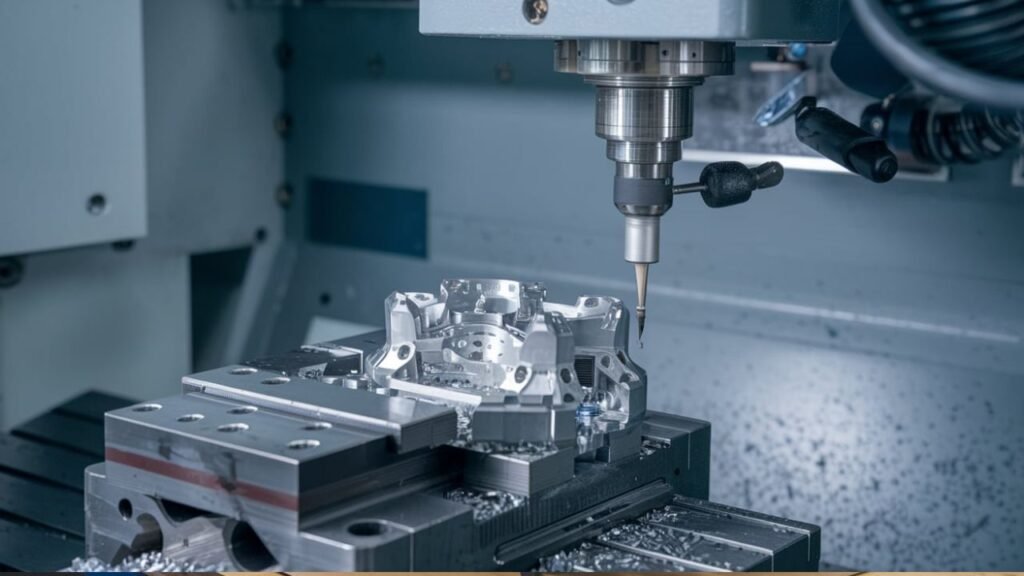
Maintenance should be treated as part of the design process, not an afterthought. A well-maintained router performs more consistently and lasts longer. Regular checks of axes, belts, rails, coolant systems, and tool holders help prevent unexpected breakdowns. For milling applications, the same principle applies: vertical, horizontal, and CNC milling machines each serve different roles, with vertical machines often favored for precision work and horizontal machines better suited to heavy or bulk material shaping.
Cutting tool selection can make or break the final result. The right tool geometry, coating, and material can improve chip evacuation, reduce heat, and produce a cleaner finish. In many cases, the quality of the finished component depends less on the machine’s power and more on the correct tool choice. Safety remains non-negotiable. Proper guarding, lockout procedures, and personal protective equipment protect operators from flying chips, noise, vibration, and other hazards that are common in machining environments.
Precision cutting also depends on understanding the material. Wood, aluminum, plastics, composites, and metals each behave differently under cutting conditions. Feed speed, spindle speed, and depth of cut must be matched to the material’s hardness, grain, and thermal response. Quality control then verifies that the final part meets specification through routine measurements, inspection records, and repeat checks across batches.
Advanced CNC techniques expand what is possible. Multi-axis machining allows complex geometries to be cut in fewer setups, improving accuracy and opening design possibilities that are difficult or impossible with standard three-axis work. High-speed machining can reduce cycle times and improve surface finish when the machine, tools, and program are properly matched. Automation further increases consistency by reducing manual intervention, lowering the chance of human error, and enabling more predictable production schedules.
Even with careful planning, problems can occur. Common CNC issues include tool breakage, poor surface finish, chatter, and machine alarms. Early detection through monitoring, test runs, and consistent setup procedures helps prevent small anomalies from becoming expensive failures. When an issue arises, a clear troubleshooting response is essential: identify the cause, implement a fix, verify the result, and update maintenance or programming practices to reduce the chance of recurrence.
Workflow optimization ties all of these elements together. Removing unnecessary steps, improving handoffs between design and production, and using software tools for automation and real-time data can significantly increase throughput. Continuous assessment of cycle times, error rates, tool life, and setup performance helps manufacturers identify where to improve. In the end, CNC design techniques are not just about running a machine; they are about building a disciplined system that turns ideas into reliable, precise, and repeatable production.