Precision aluminum assemblies often depend on tightly controlled diameters, but anodizing can quietly change those dimensions. The process does not merely sit on the surface like paint. As a conversion coating, it transforms part of the base metal into oxide while also building beyond the original surface. On a shaft, the coating increases the outside diameter. Inside a bore, it grows toward the center, reducing the hole size. That dual effect can turn a designed press fit, slip fit, or bearing bore into an assembly problem.
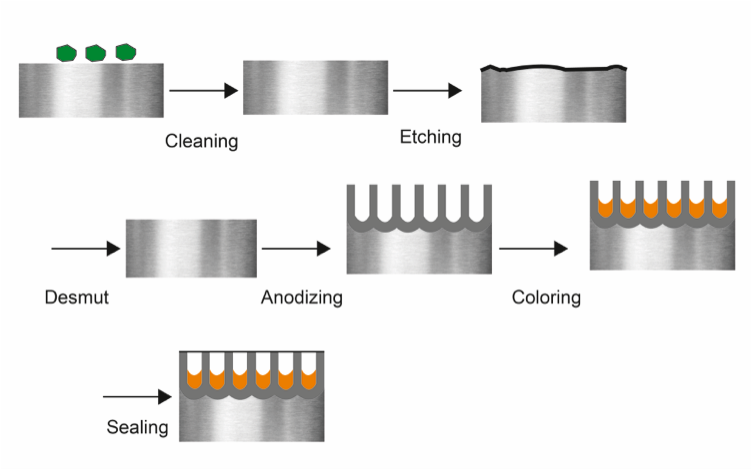
Type III hardcoat creates the greatest risk. A 0.002-inch hardcoat can change a mating diameter by about 0.002 inch, which may exceed the entire interference allowance on small precision parts. Many light press fits use only 0.0005 to 0.001 inch of interference per inch of diameter. Once the oxide layer is added, the intended fit can become too tight, bind during assembly, or fail completely. Type II anodizing is less severe, usually altering dimensions by only a few ten-thousandths of an inch, but even that can matter when tolerances are tight.
Beyond dimension changes, the anodized layer itself is hard and brittle. Pressing a shaft through an anodized bore can chip or fracture the coating, especially with Type III hardcoat. Cracked oxide may leave debris inside the joint and expose areas that lose corrosion protection. For this reason, critical bearing bores, dowel holes, grounding surfaces, and sliding interfaces should rarely be left coated without a clear manufacturing plan.
The most reliable solutions are practical and widely used in production. First, mask the fit surface so it remains bare aluminum. Second, anodize the part and then ream, hone, or grind the critical bore to final size. Third, machine dimensions in advance to compensate for expected oxide growth, although this is safer with predictable Type II than with variable Type III. Fourth, choose a thinner coating when wear resistance is less important than fit accuracy. For most precision assemblies, masking or post-anodize finishing provides the most repeatable result.
Clear manufacturing notes are essential. Drawings should identify which surfaces must remain bare and whether each toleranced dimension applies before or after anodizing. Without those instructions, machinists may cut nominal sizes while anodizers coat every surface, destroying the fit before inspection. At XC Machining, DFM reviews can compare fit tolerances against expected coating buildup and recommend masking or secondary finishing before production begins.