For engineers and new product introduction managers, the choice between 6061-T6 and 7075-T6 is rarely a simple line-item decision. Both alloys appear similar on datasheets, yet their shop-floor behavior diverges sharply. In real CNC production, a mismatched alloy can add $4,200 to $11,600 in scrap, rework, and unnecessary over-specification across a typical 500-part run. At XC Machining, where about 240 aluminum programs are released each month, alloy selection creates more downstream surprises than most other material calls.
6061-T6 is an aluminum-magnesium-silicon alloy that yields around 276 MPa, maintains tensile strength near 310-330 MPa, and welds easily. These direction-averaged T6 values come from ASM Aerospace Specification Metals and ASTM B221/B211 data for extruded and rolled product forms. It is often the practical default for general machining, welded frames, marine enclosures, consumer electronics housings, and parts whose worst-case stress remains below roughly 200 MPa. Its lower cost, better corrosion behavior, and cleaner anodizing make it attractive for components where extreme strength is not required.
7075-T6, by contrast, is an aluminum-zinc-magnesium-copper alloy with substantially higher load capacity. It yields around 503 MPa, reaches tensile strength of about 560-580 MPa, and offers a much higher fatigue endurance limit, roughly 159 MPa compared with 95 MPa for 6061-T6. That makes it suitable for aerospace primary structure, racing and bicycle frames, robotic joints, firearm receivers, mold plates, and other high-stress parts where weight is constrained and welding is not required.
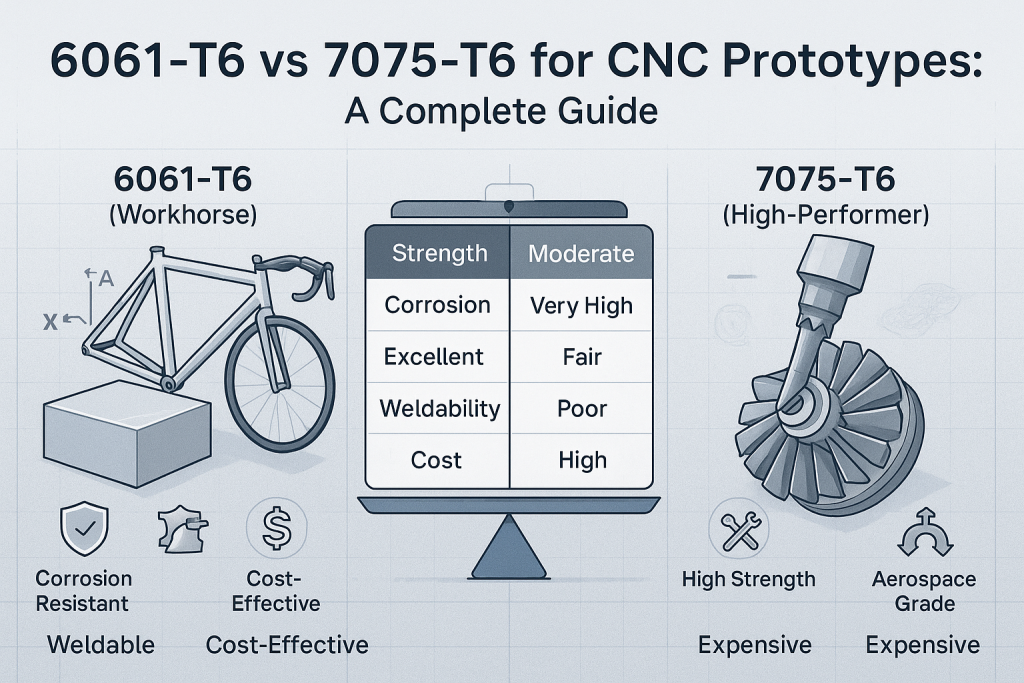
The cost difference is not limited to raw material. In 2026, 7075 bar stock can run 80 to 120 percent above 6061, while machining time may increase 15 to 25 percent because the harder alloy wears tools faster and is typically cut 20 to 30 percent slower at comparable metal removal rates. The finished-part premium can therefore reach 2.4 to 2.8 times the 6061 equivalent. That does not mean 7075 is always the wrong choice; it means the strength margin must be justified by the load case.
A common error is specifying 6061 to save money when the part actually needs 7075. Such substitutions often survive static testing but fail in service through fatigue cracking or permanent deformation under shock loads. The opposite error is equally expensive: using 7075 for a low-stress bracket simply because the data sheet looks stronger. In XC Machining’s RFQ experience, 6061 appears on about 70 percent of incoming aluminum requests, but it is the correct alloy only about 60 percent of the time, leaving a 10 percent gap where the design intent and material choice do not match.
Post-processing also changes the decision. 6061-T6 accepts Type II and Type III anodizing with better color consistency, while 7075’s copper content produces a darker, less uniform base and often requires black anodize for appearance-critical surfaces. Corrosion resistance is another practical divider: 7075 performs roughly 60 to 70 percent as well as 6061 in marine, humid, or chloride-rich environments, and 7075-T6 can be vulnerable to stress-corrosion cracking under sustained tensile load. For such cases, 7075-T73 or 6061 may be safer.
The best selection method is application-first. If the part must be welded, choose 6061 or another weldable alloy and use mechanical fastening or adhesive bonding when 7075 is required. If the part faces cyclic loading, peak stress, or strict weight limits, evaluate 7075. If appearance, corrosion, or cost dominate, 6061 is often the stronger business decision. XC Machining supports both alloys, including 7075-T73 and in-house anodizing, to help teams turn material specs into predictable, production-ready parts.